Everything it does, in plain words.
One system for the whole practice: the diary, the client record, the hearing tests, the aids and their serial numbers, the stock, the claims, the money and the follow-up. Below is the lot.
Every screen on this page is the real product. If you would rather check the exhaustive list line by line, the full table is on the pricing page.
Three people use this, and they use it differently.
- At the front desk
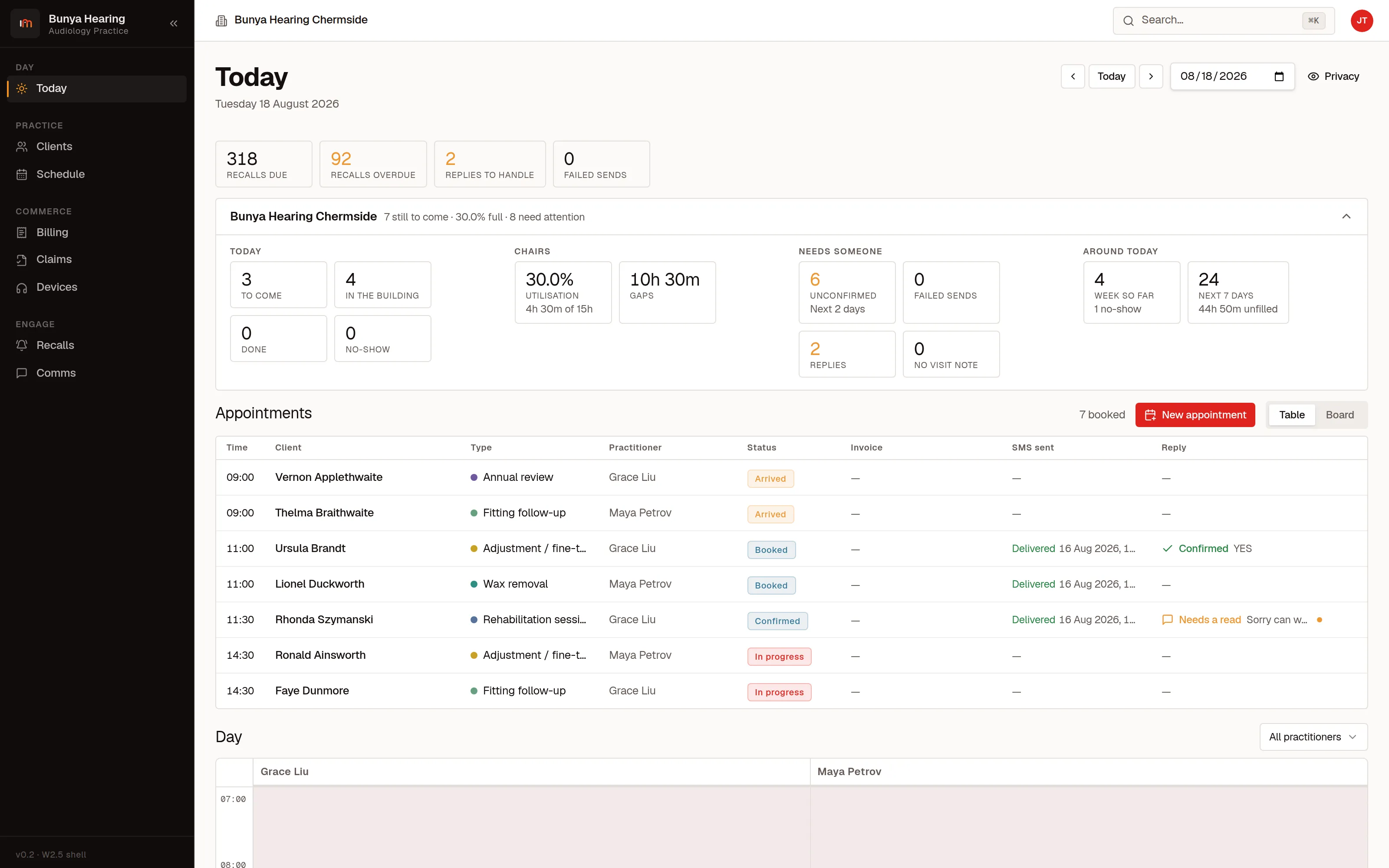
- You book, you take the money, you answer the phone while someone is standing in front of you. The day is one screen: who is coming, who has arrived, who has not replied to their reminder, and how much of the day is still unbooked.
- In the fitting room
- You test, you fit, you review. The client's whole history opens beside the test you are typing, the audiogram is data rather than a picture, and the date you fitted is what the recall rules count from.
- Running the practice
- You want the claims lodged, the stock counted, the invoices out and the numbers true. Every figure on a dashboard is the sum of rows you can open, and your bookkeeper logs in to the money without seeing a clinical note.
What is in here.
11 parts · 10 with screens
Your day, booked and run
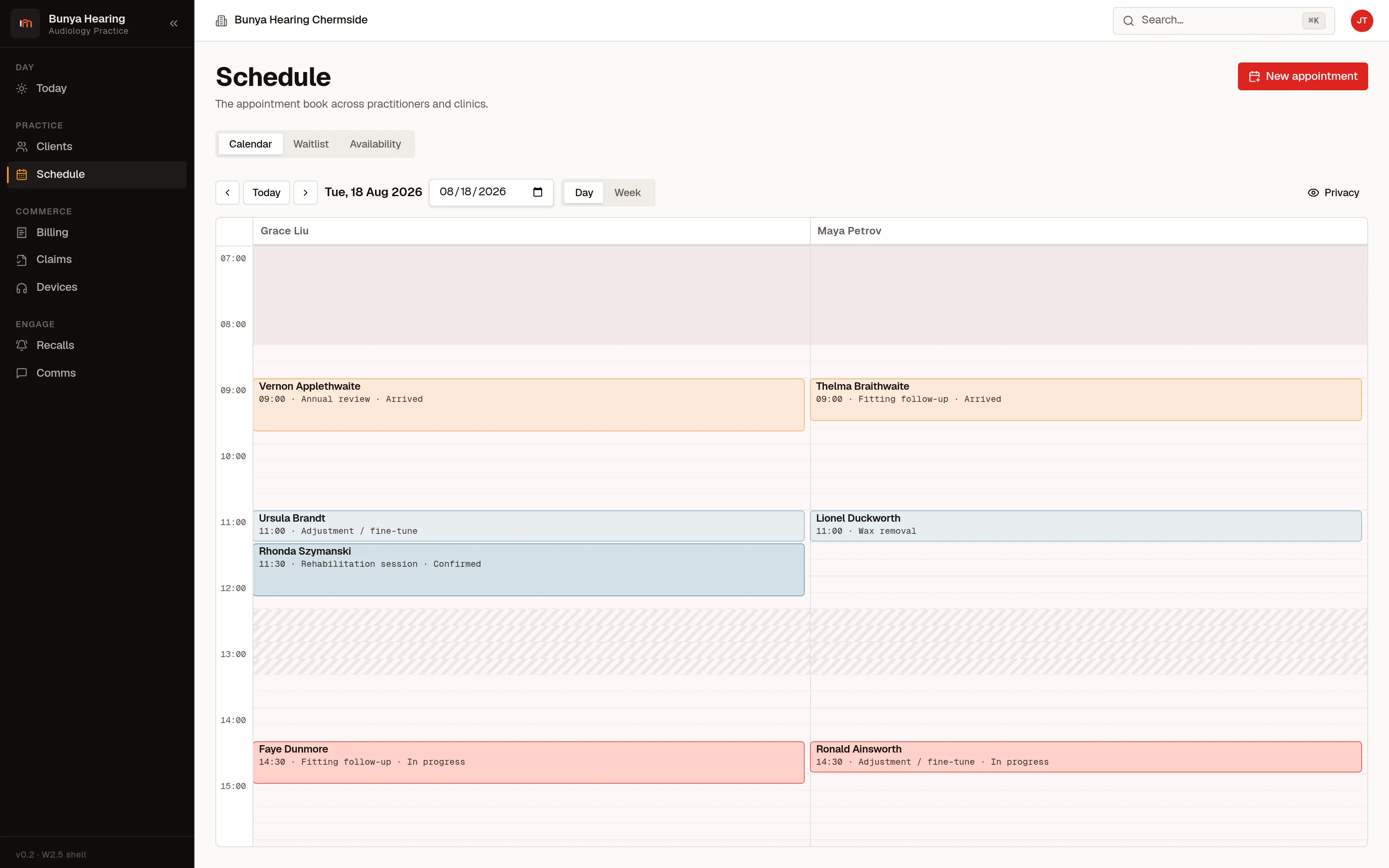
The appointment book for one audiologist or ten, across one clinic or several, with the reminders and the follow-up attached to it.
- One calendar, however many of you there are
- See a day as columns of audiologists, or a week as one person's diary. Rooms book alongside people, so the sound booth cannot be double-booked.
- Each clinic has its own day
- Switch between sites, or look at all of them at once. A receptionist at one clinic sees that clinic; an owner sees the lot.
- Reminders send themselves
- Each appointment type carries its own lead times and templates, one per channel, and the reminder goes out on its own by SMS or email. What was sent, when, and whether the provider confirmed delivery sits on the appointment.
- Replies come back to the right appointment
- A reply is attributed to the message it answers, so a handset two people share still lands on the right appointment. A “YES” confirms that appointment on its own; anything else is marked unhandled on the day's list until a person deals with it.
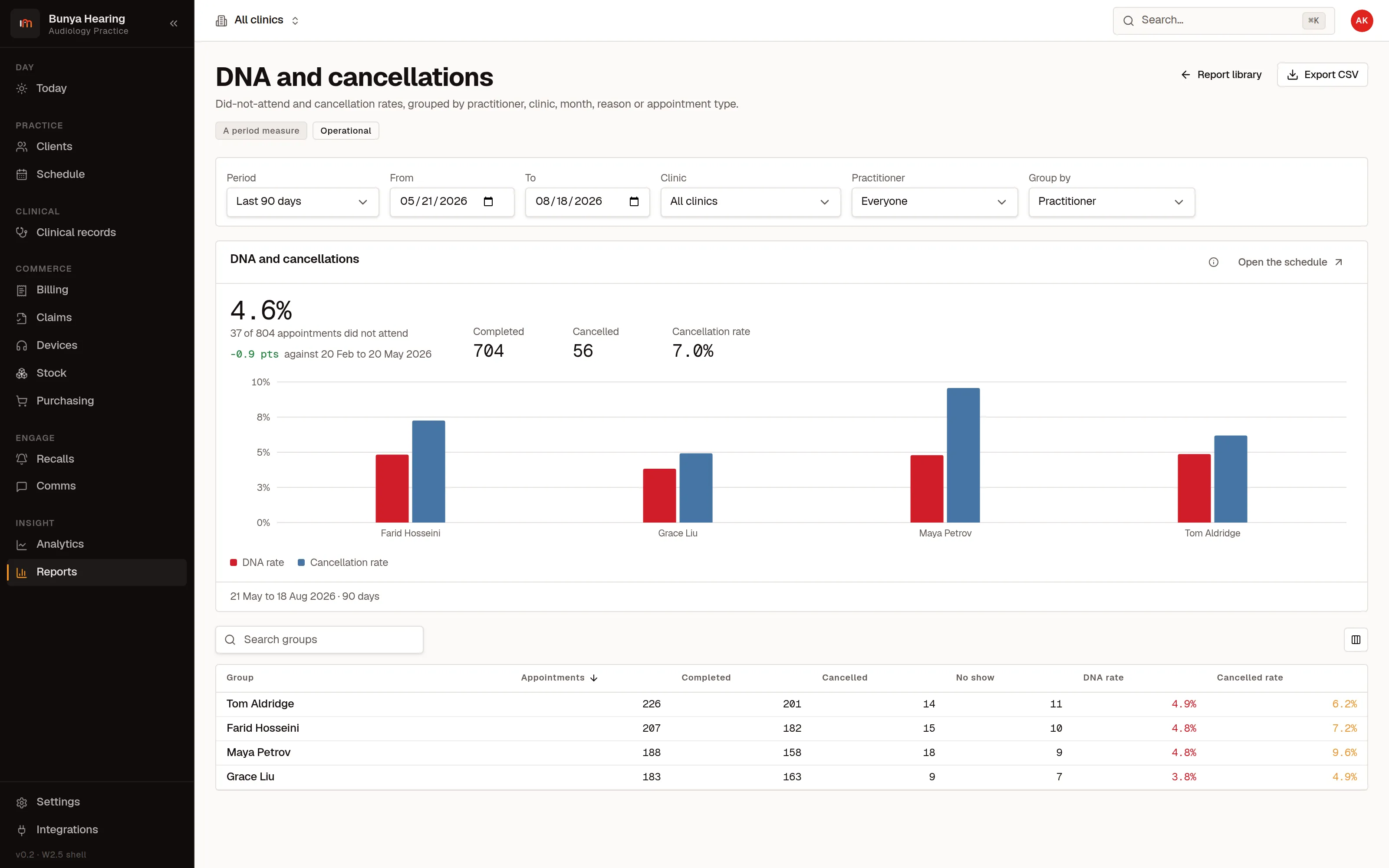
- Cancellations and no-shows are counted
- Every cancellation is recorded with a reason from your own list. Did-not-attend and cancellation rates per audiologist follow from it.
- The waitlist knows who wanted that slot
- When somebody cancels, the waitlist tells you who wanted that slot instead of you trying to remember.
- Repeat bookings
- A course of appointments is booked once as a series and every occurrence becomes a real appointment. Where one of them clashes it is handed back for you to place, never silently skipped.
One record per client, and only one
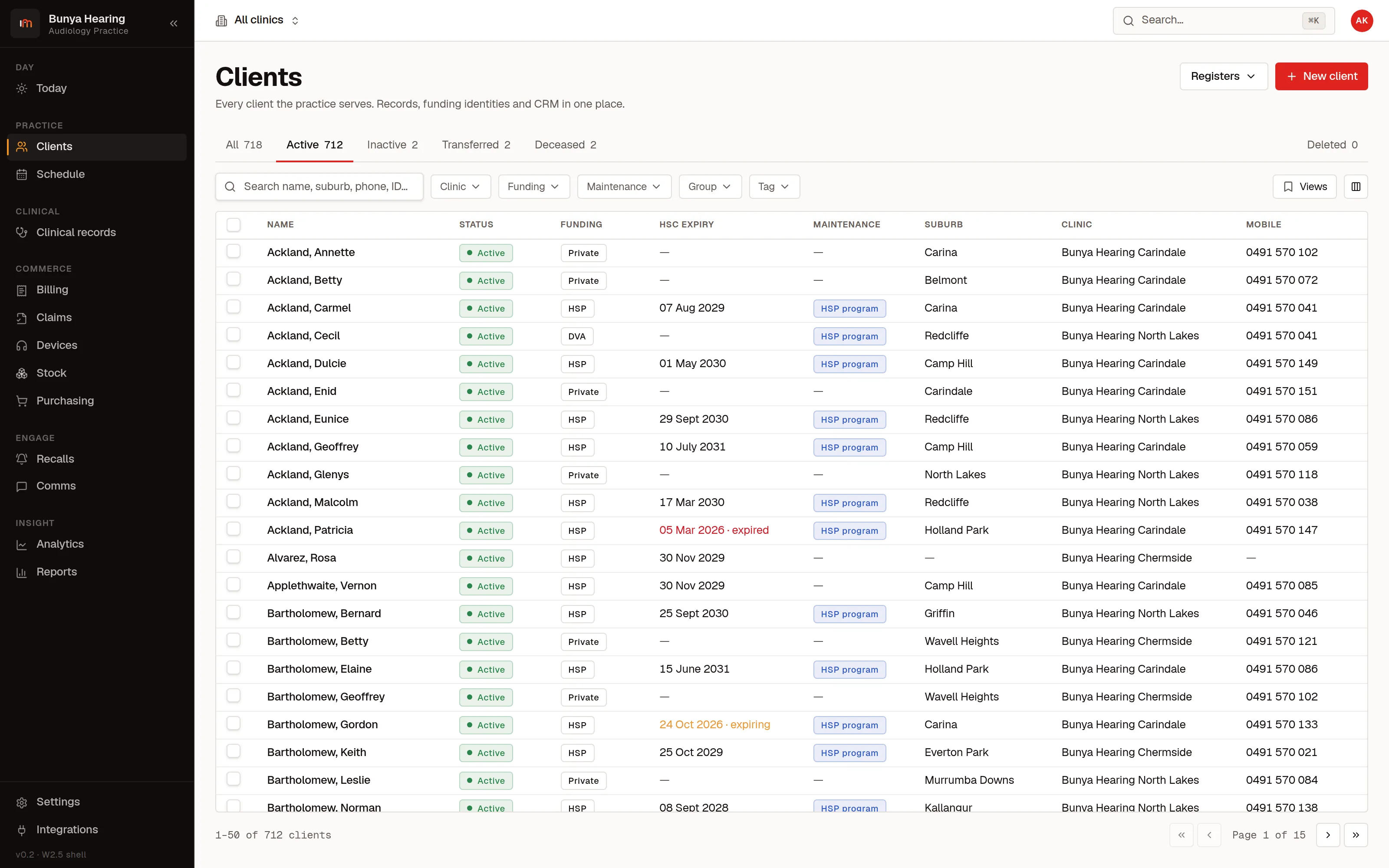
The client record is the middle of the product. Everything else is a view of it: the tests, the aids, the invoices, the claims, the letters. There is never a second address book to keep in step.
- Everything about a person in one place
- Contact details, funding, home clinic, next of kin and carers, documents, and every call, text and letter that has ever gone out.
- Find anyone in a keystroke
- One field over the whole product, reached with ⌘K from any screen, searching clients, invoices and claims by name, phone number or id. A number typed without spaces still finds the record that stores it with them.
- Lists you arrange, and keep arranged
- Choose your columns, sort them, filter them, and save the arrangement as a named view you can come back to. Select rows and act on the selection: tag them, tick them off, take them away as a file.
- Flags that stop a mistake
- Alerts sit at the top of the client record, each with its severity: the client who cannot be phoned before midday, the one who needs an interpreter.
- Duplicates caught at the door
- Type a surname into a new client and the existing records that share it appear, with the ones matching on date of birth or mobile called out.
- Groups and tags
- Aged-care facilities, employers, referral cohorts as named groups; free-text tags for everything else. The directory filters by either, and tagging a selection is one action.
- Nothing is really deleted
- Deleting flags the row rather than destroying it. Delete a client, a claim, a draft invoice, a fitting or a visit and the product offers Undo in the same breath.
Hearing tests and fittings
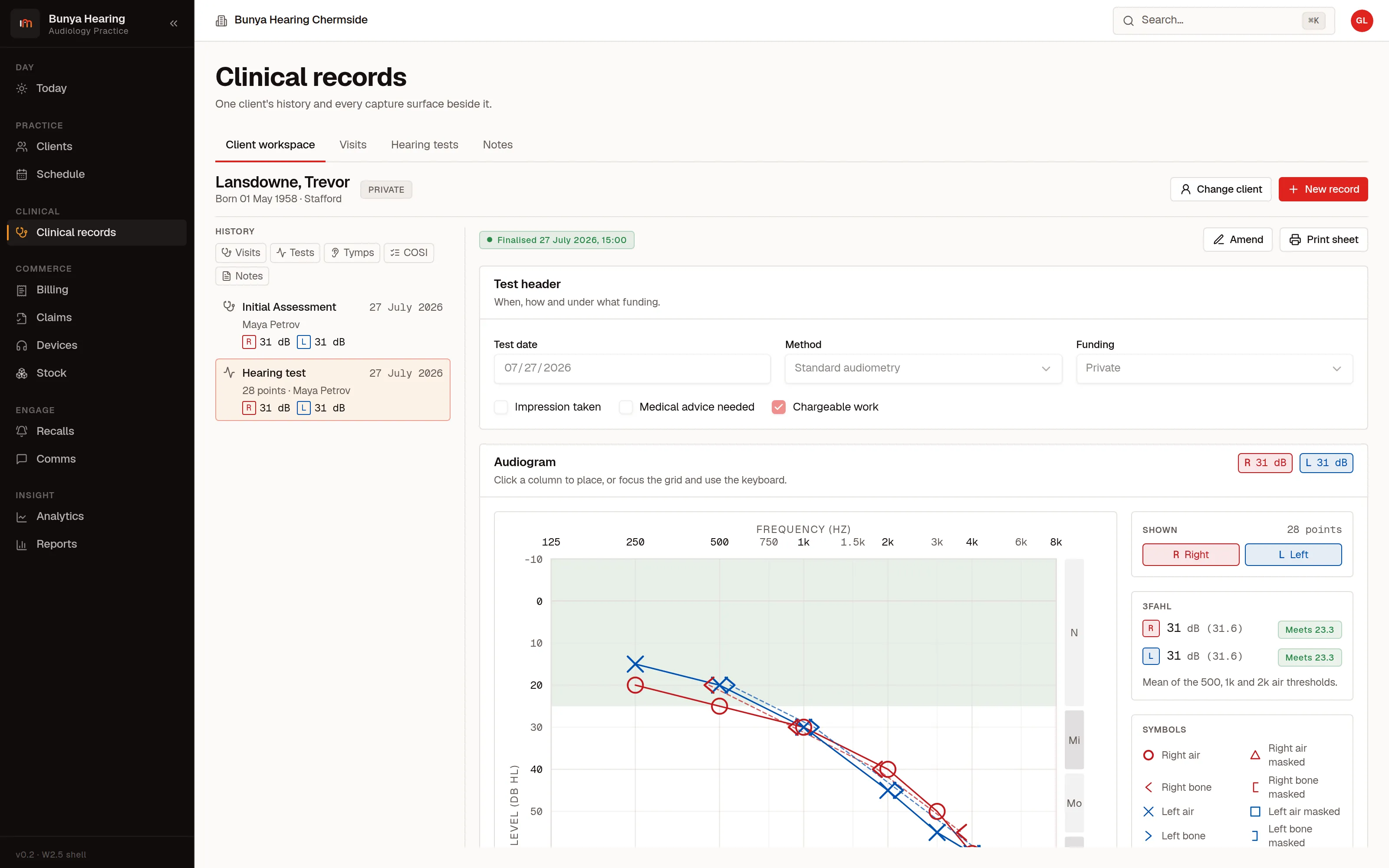
Audiology data is structured per ear, everywhere, and it is data rather than a scanned picture, which is what makes it searchable, printable and worth keeping.
- The audiogram, drawn properly
- Air, bone, masked, uncomfortable and most-comfortable levels, each ear separately, with the standard symbol set. Click the plot or drive it from the keyboard.
- The averages come out of the thresholds
- Three-frequency average hearing level comes out of the thresholds, both ears. So does percentage loss of hearing, which is the figure a compensable matter is reported in, computed from the weighting table your practice loads. That table is versioned reference data rather than a constant in the code.
- Eligibility is checked as you type
- The Hearing Services Program's fitting threshold is applied to the test in front of you: each ear's average against 23.3 dB, compared on the exact mean rather than the integer the claim form carries, with the verdict beside the plot.
- Tympanometry classified
- Type, static compliance and middle-ear pressure per ear, with the significant results flagged.
- Audiograms move in and out as NOAH
- Import the HIMSA standard-audiogram XML, including the .nhax file it arrives in, and export a test back as that XML. The import previews before it creates anything, and a name or date of birth that does not match makes you pick the client.
- What the fitting did for someone
- COSI goals and their achievement, so you can show what the fitting actually did for someone.
- Letters and reports
- Assessment letters and reports assembled from the record and sent as PDF or RTF, so referral software takes them without a fight.
- A finalised record can be amended, visibly
- Corrections are amendments with a reason and a history, not a quiet overwrite.
Hearing aids, from the box to the ear
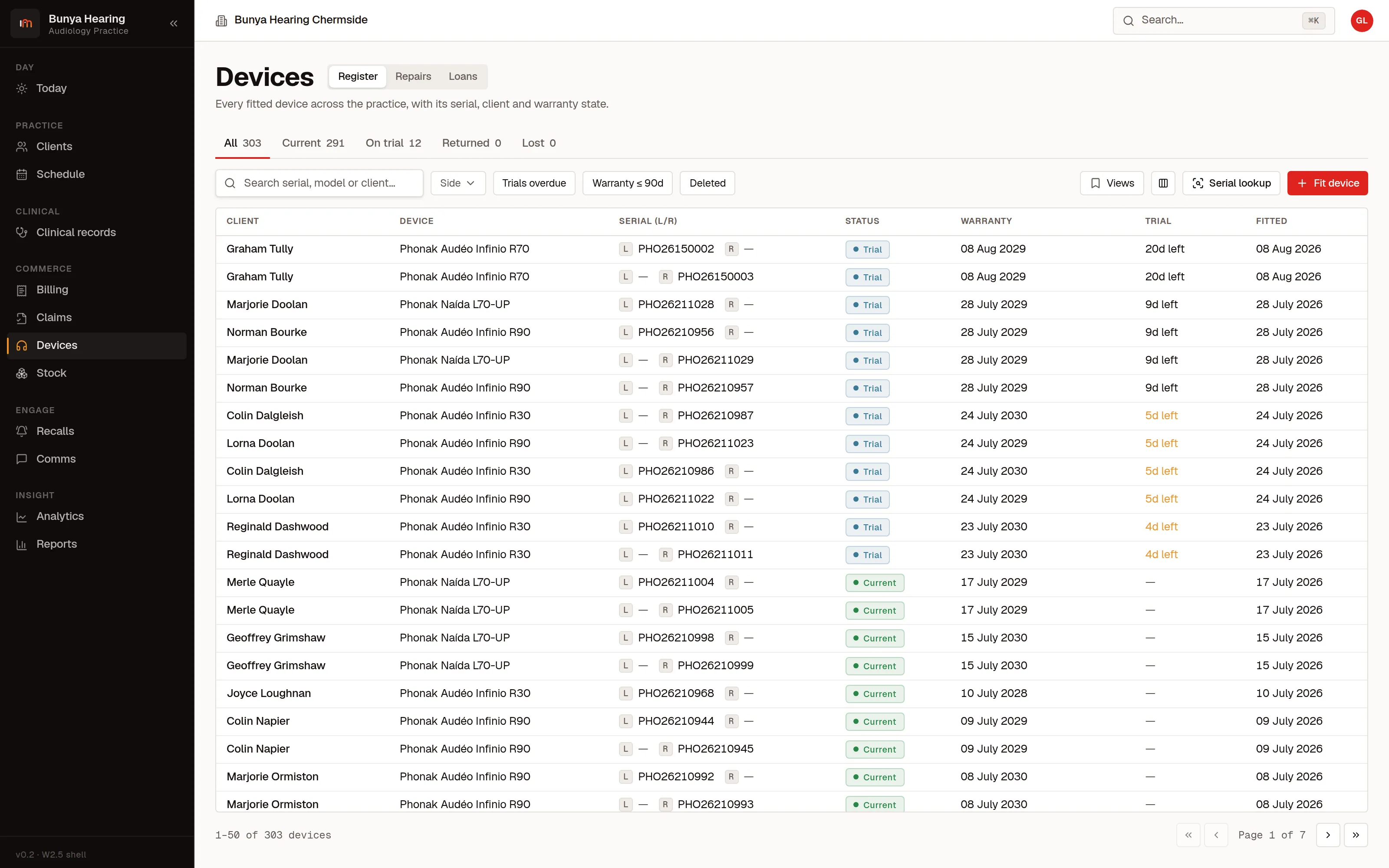
This is the part a general allied-health system has never had to build. A hearing aid is a serial-numbered object with clocks running against it, and it has to stay attached to the person wearing it and the invoice that sold it.
- Serial numbers, left and right
- Every aid carries its serial from the purchase order to the patient's ear to the invoice line.
- The trial clock and the warranty clock
- The trial runs from the date fitted; the warranty runs to the supplier's own date where they gave one, and from the fitting date otherwise. Which fittings come out of warranty next month is one filter on the register.
- The whole fitting, recorded
- Make, model, side, style, battery, mould type and material, vent, tubing, dome, receiver and wax filter.
- Repairs tracked out and back
- A repair goes out to the supplier carrying their job number and comes back, and the client's record says where their aid is the whole time. Search the repair list by that number, by the serial, or by the client.
- Loan aids that come home
- A pool of loan devices issued against a client and returned against them, so you know what is out and with whom.
- Quotes before the sale
- The Hearing Services Program's mandated device quote, left and right, carrying the program's benefit against the cost to the client on each ear plus the maintenance cost, the warranty terms and the returns policy. A client sees what they will actually pay before they sign.
Stock, ordering and what things really cost
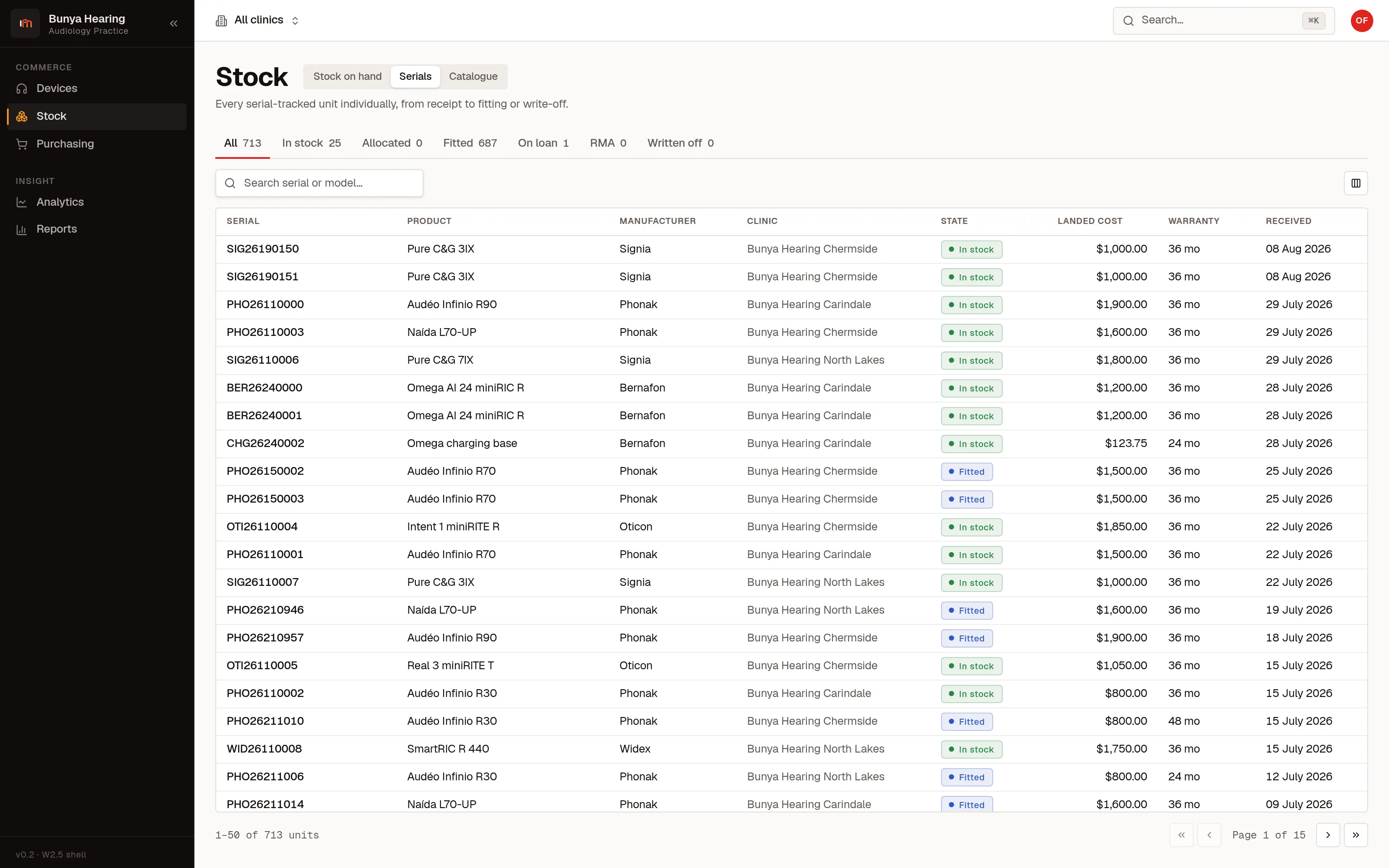
What is on the shelf at each clinic, what is on order, and what each individual unit cost you, recorded against its serial when it was received.
- Stock on hand, per clinic
- Aids, moulds, batteries, domes, receivers and consumables, counted where they physically are, and transferable between sites.
- Purchase orders and goods receipt
- Order from a supplier, receive against the order, and have the serials enter stock as you receive them.
- Cost per serial, so margin is real
- Each unit carries the landed cost it was received at, defaulted from the purchase-order line. Because that serial reaches the invoice line, cost of goods on a sale is that aid's own cost rather than an average across the shelf.
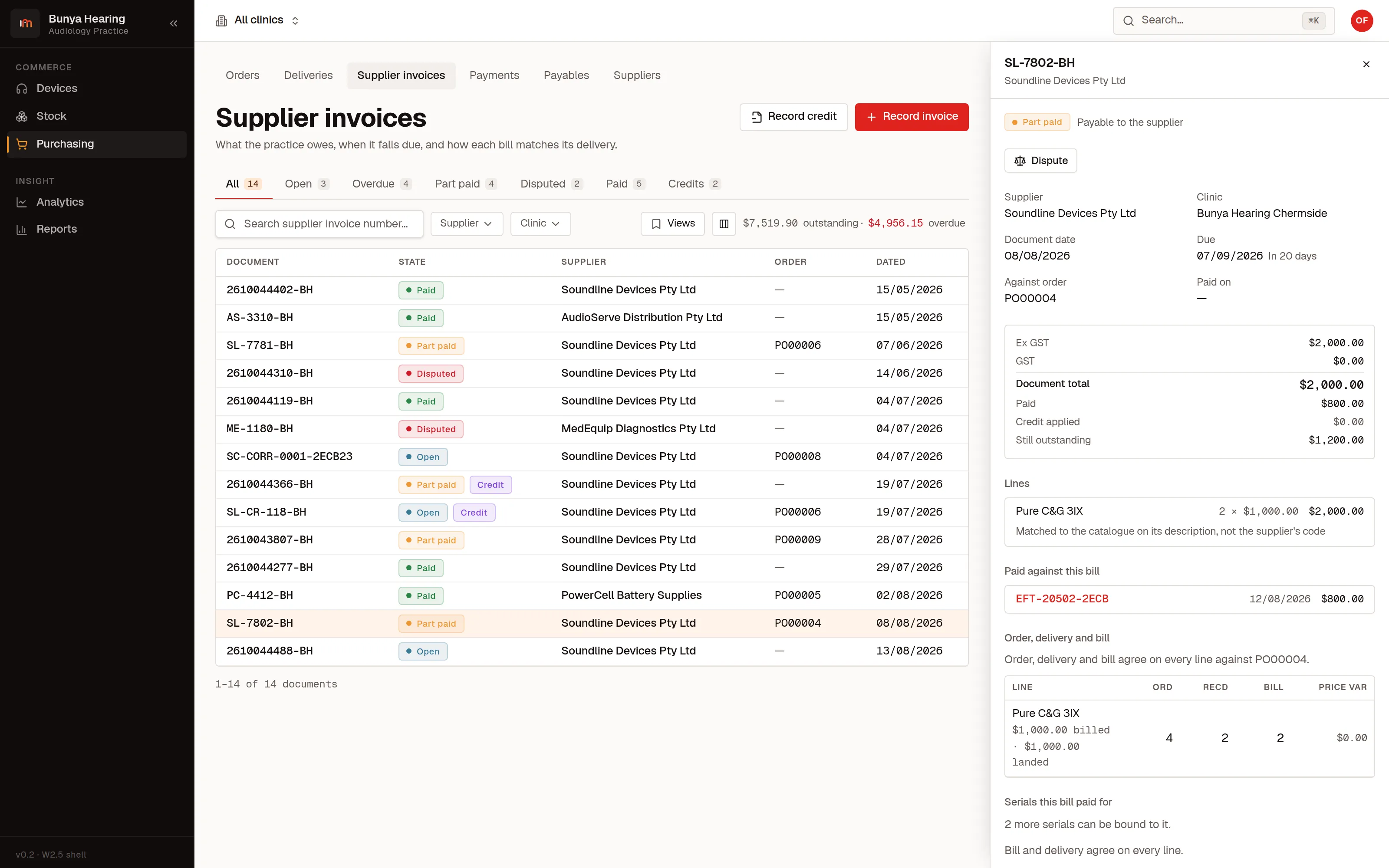
- Supplier invoices and credits
- What you owe each supplier, on what terms, and how overdue. Credits allocate against invoices instead of floating.
- Reorder before you run out
- Levels per clinic and a list of what has fallen below them.
Claims and funding
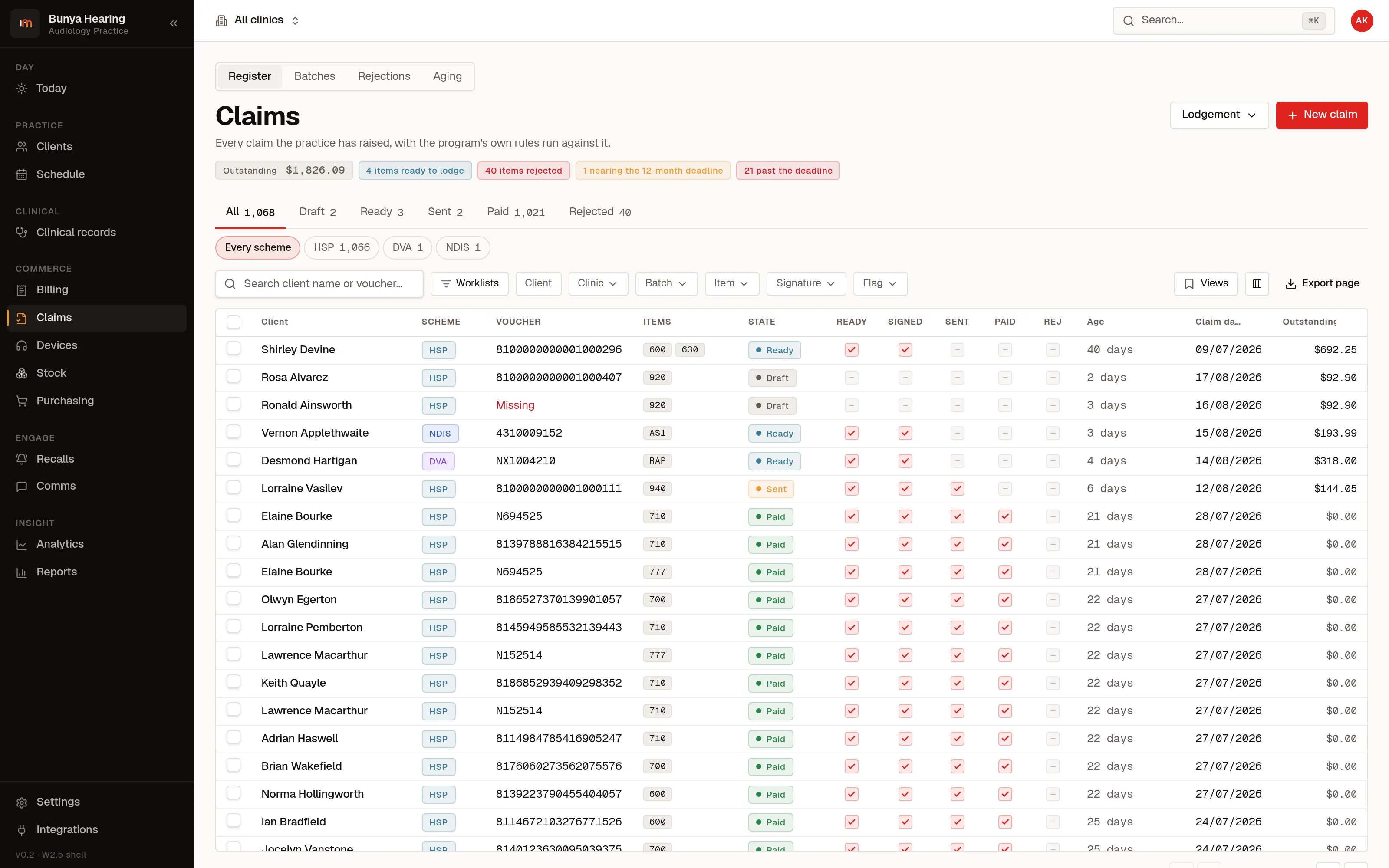
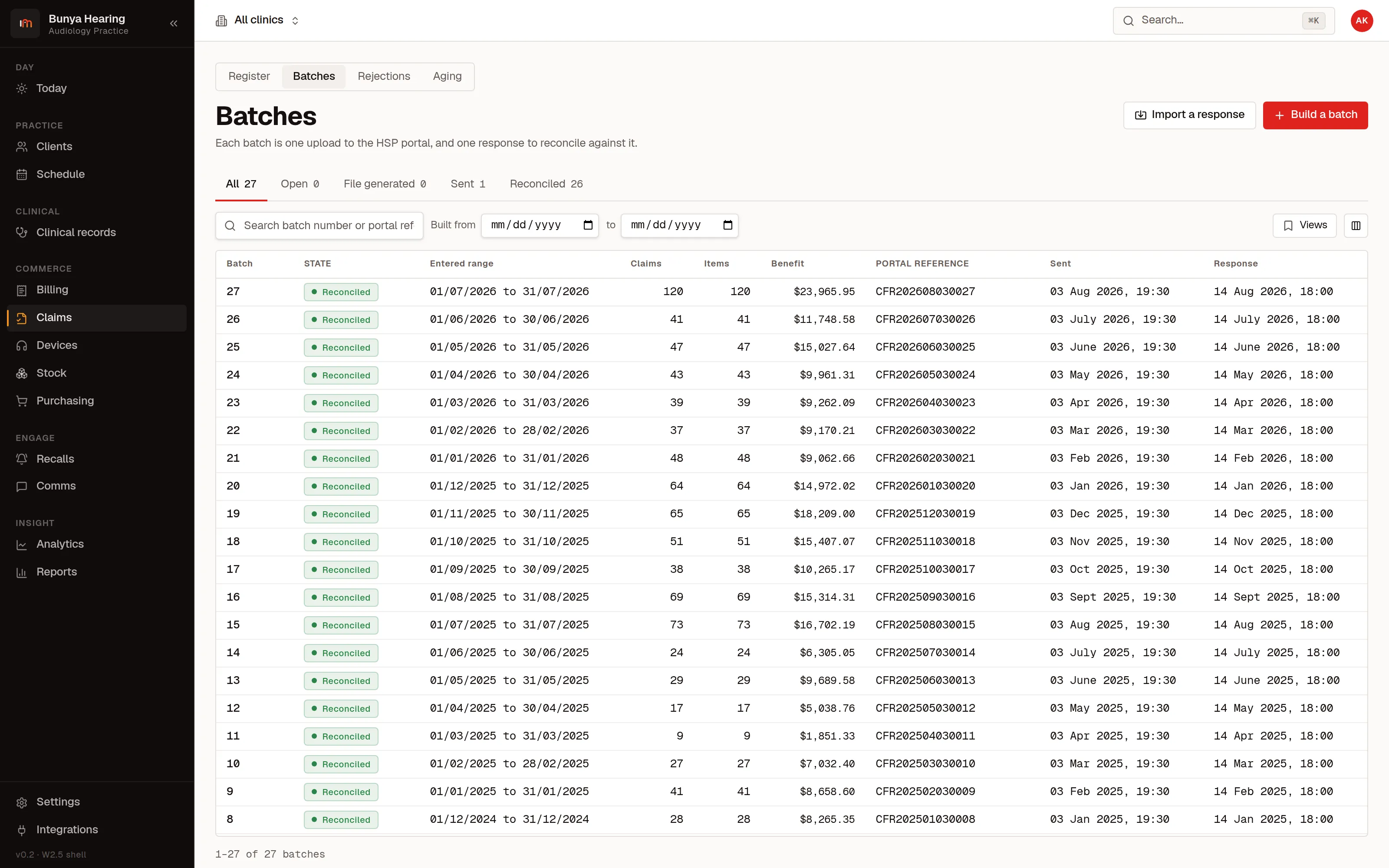
The Hearing Services Program is handled end to end, from voucher and fee schedule to claim file and return file. DVA, NDIS and WorkCover are lodged with the payer their own way and tracked in the same register beside it.
- HSP from voucher to payment
- Vouchers and their expiry, item numbers priced from the schedule, claim items marked ready and signed, batched into a claim file, sent, and paid off one item at a time when the return file comes back.
- Rejections tell you why
- A rejected item carries the program's own reason code and sits in a queue until somebody deals with it.
- Maintenance and batteries
- The annual Maintenance and Battery claim, with the item number derived from the fitting rather than typed, whether monaural, binaural, private device or relocated, and a worklist of who has come due. Claiming it a month early is refused with the rule named.
- Clients who move to you
- A client who transfers in mid-cycle claims relocated maintenance, with the co-payment rule and the twelve-month bar enforced rather than remembered.
- DVA, NDIS and WorkCover in the same register
- Different schemes, different rules, one place to see what is owed to the practice and how old it is. A DVA device needs its prior authorisation on file before the claim can go ready.
- Deadlines you can see coming
- Items nearing the claiming deadline are counted at the top of the register, and so are the ones that have gone past it. The window is a setting, because the program's is six months and your contract may say otherwise.
- Each clinic claims as itself
- Every site has its own six-digit provider site id, and batches are built per site, which is how a multi-clinic practice claims correctly.
Getting paid
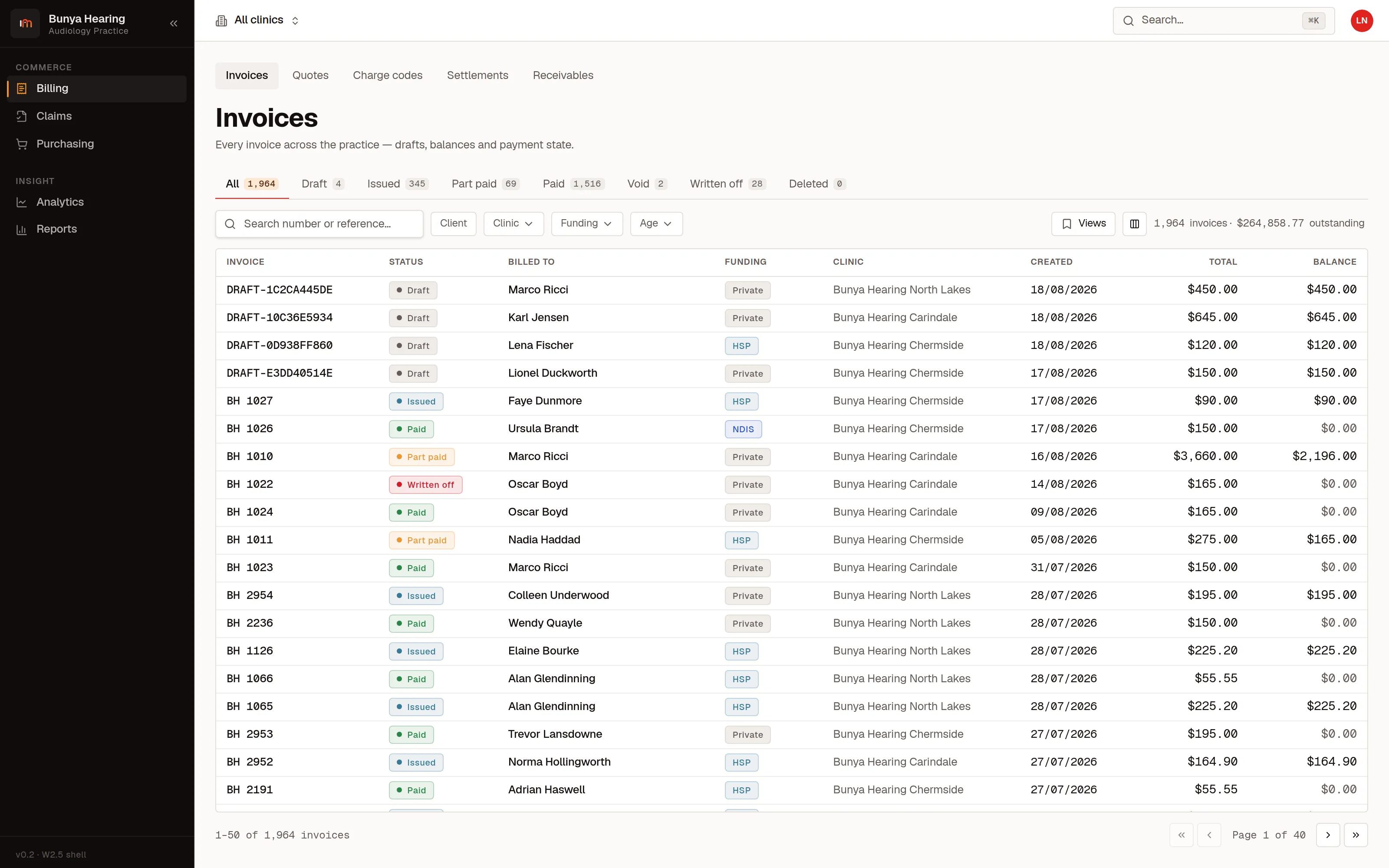
Quotes, invoices, receipts, payments and what is still owed, with Australian tax rules applied rather than approximated.
- Invoices that satisfy the ATO
- Tax invoices carry the wording, your ABN and the GST amount the rules require, with mixed invoices itemised so the taxable lines are identifiable.
- Part payments and payment plans
- A client can pay a deposit now and the rest later, and the invoice knows what is still owed.
- Cards, without a margin taken
- Take payments through Stripe or Square at their rates. We do not add anything on top of what your patients pay.
- Settlements match themselves
- The settlement file from your payment provider is read in and matched against the payments it settles. An exact reference match settles itself; a probable one is offered and settles nothing until somebody confirms it. Re-uploading the same file changes nothing.
- What you are owed, by age
- Debtors by age, per clinic, with the claims side and the client side both visible.
Keeping people coming back
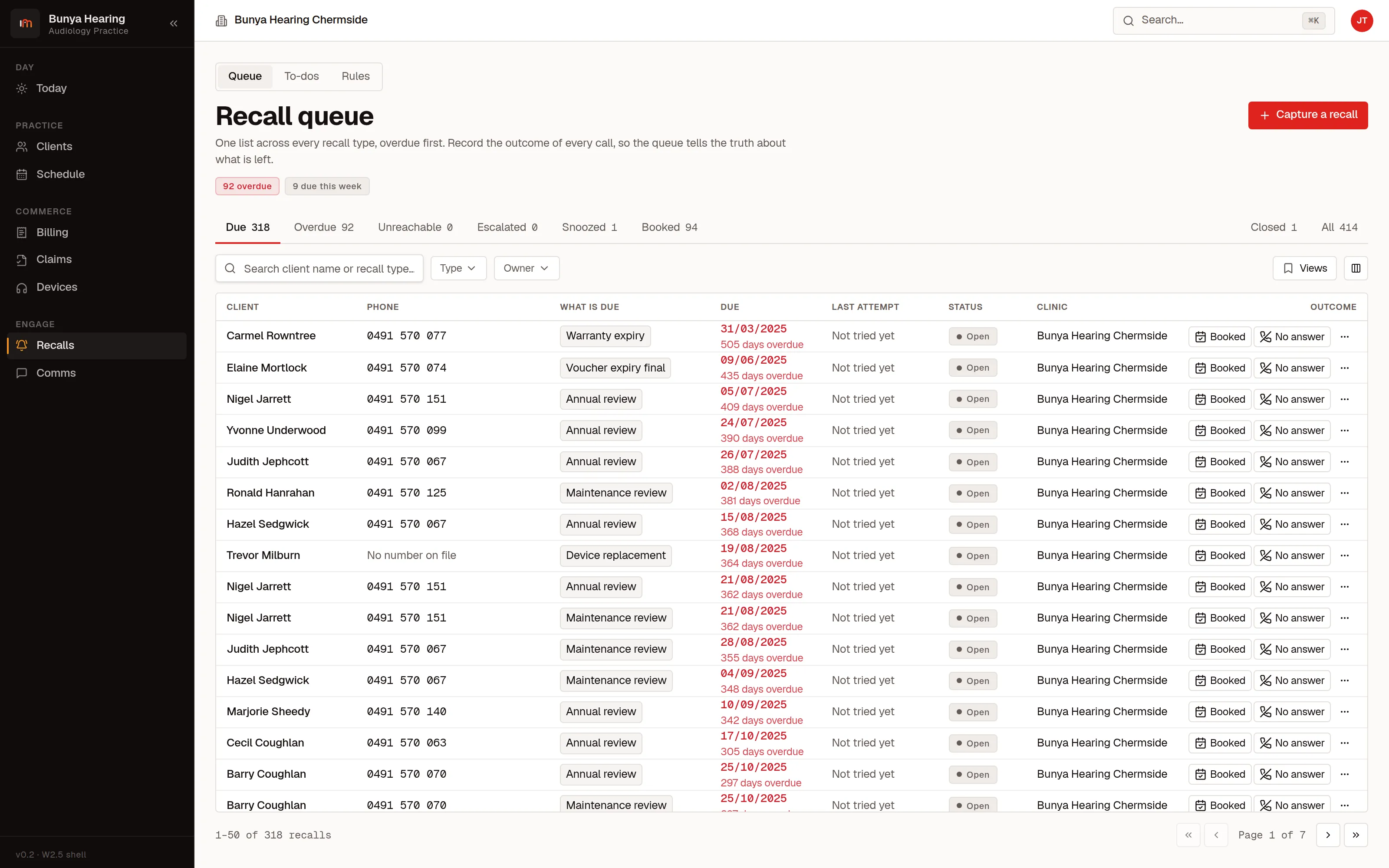
Most of the revenue in an audiology practice is in the years after the first fitting. The follow-up is therefore a rule the system applies to your whole fitted book.
- Recalls come out of a rule
- A rule is an event plus an offset in months: twelve after a fitting, or ahead of a warranty, trial or voucher expiry. Run the rules and the fitted book becomes a due list. It closes the entries an appointment already answered, and reopens the ones a no-show undid.
- A work queue per clinic
- Who is due, why, and what happened last time somebody rang them. Each contact is recorded with its next action.
- SMS, email and letters
- Send from the client record or straight off a queue row, merged from your own templates. The server renders the preview through the same engine that sends it, so what you approve is what goes out, and every send is logged on the client.
Knowing how the practice is going
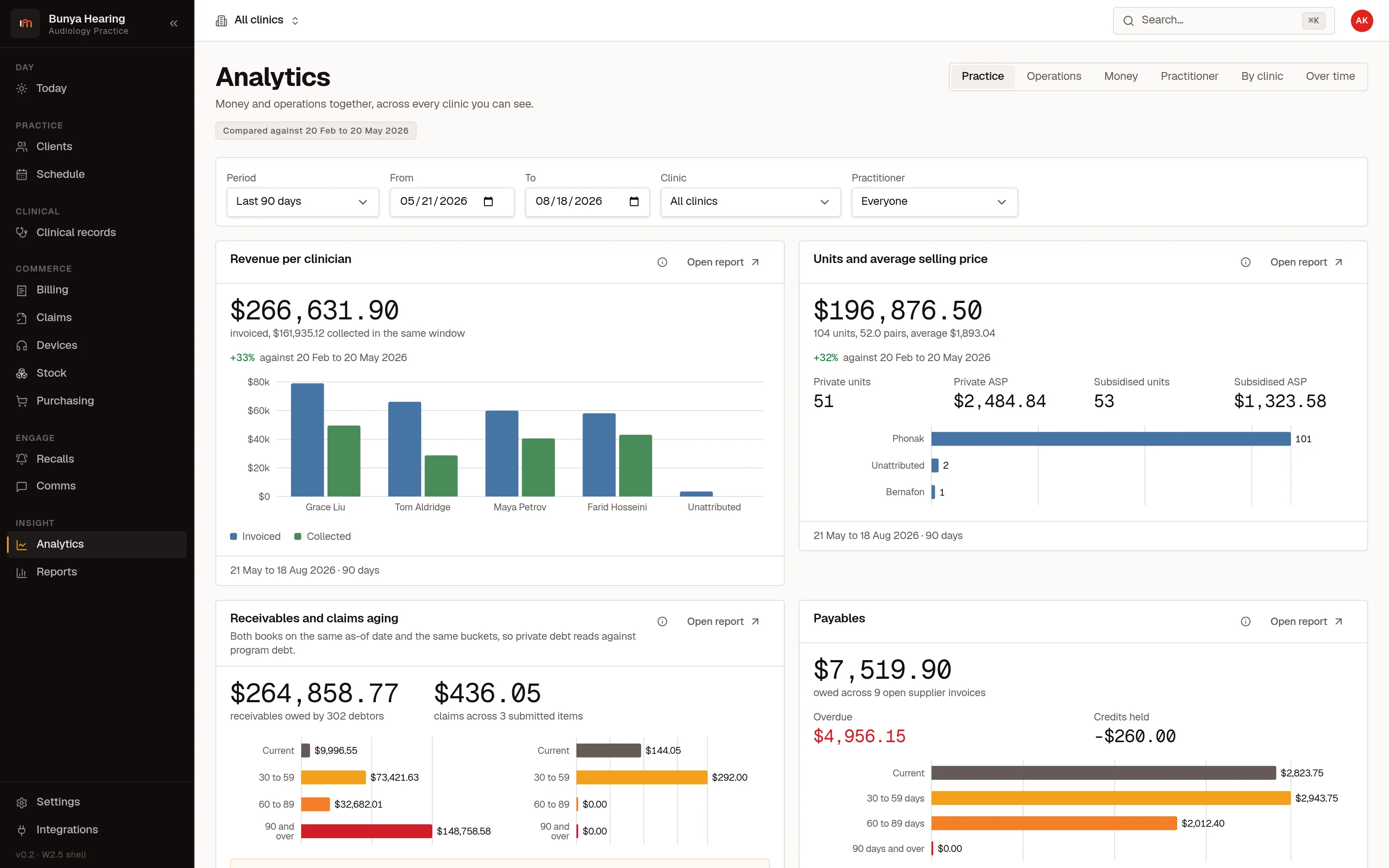
Numbers that reconcile. Every figure shown is the sum of rows you can open, so a dashboard is a place to start looking rather than something to take on faith.
- The measures a practice actually runs on
- Chair utilisation, did-not-attend rate, conversion from assessment to fitting, units sold, average selling price, brand mix, and revenue per audiologist and per clinic.
- Claims and debtors, aged
- What is outstanding, how old it is, and which scheme it is stuck in.
- Compare clinics honestly
- The same measures per site, on the same definitions, so a comparison means something.
- Take the numbers away
- Every report exports as CSV under the same capability that gates the report itself, and the export writes its own audit row. The client, claim and recall lists export the rows you selected.
Who can see what
Eight roles, scoped by practice and by clinic, and one person may hold more than one. Permission is a capability rather than a job title, which is how an external bookkeeper can log in directly without being able to reach a clinical note.
- Your bookkeeper sees the money and nothing else
- They log in themselves, they see invoices, payments and the financial reports, and the clinical record is not merely hidden. It is refused.
- Clinic access is data, not a new role
- “Receptionist at Chermside and Carindale” is two grants on one membership.
- Another practice's record does not exist
- Tenancy is enforced at the data layer. A record addressed from outside your practice answers “not found”, never “forbidden”, because forbidden would confirm it exists.
- Every change has a name against it
- Who changed what, when, and from what to what, plus the platform operator's own name when one is acting as somebody. Reads that take data out of the building are audited too: a report export, a clinical bundle, a client statement.
- Sign-in you do not have to trust us with
- Staff sign in through hosted AuthKit, so there is no password form of ours between an audiologist and their account.
What your patients see
A small, separate portal where a client can look up their own appointments. Separate sign-in, separate boundary, no clinical or financial detail.
- Their appointments, upcoming and past
- Enough for someone to check when they are next in without ringing the front desk.
- Built for an older reader on a phone
- Larger type and larger targets than the staff product, deliberately, because that is who uses it.
- A genuinely separate door
- Patients are not in the staff identity system at all. A portal account cannot reach a staff surface, by construction rather than by permission.
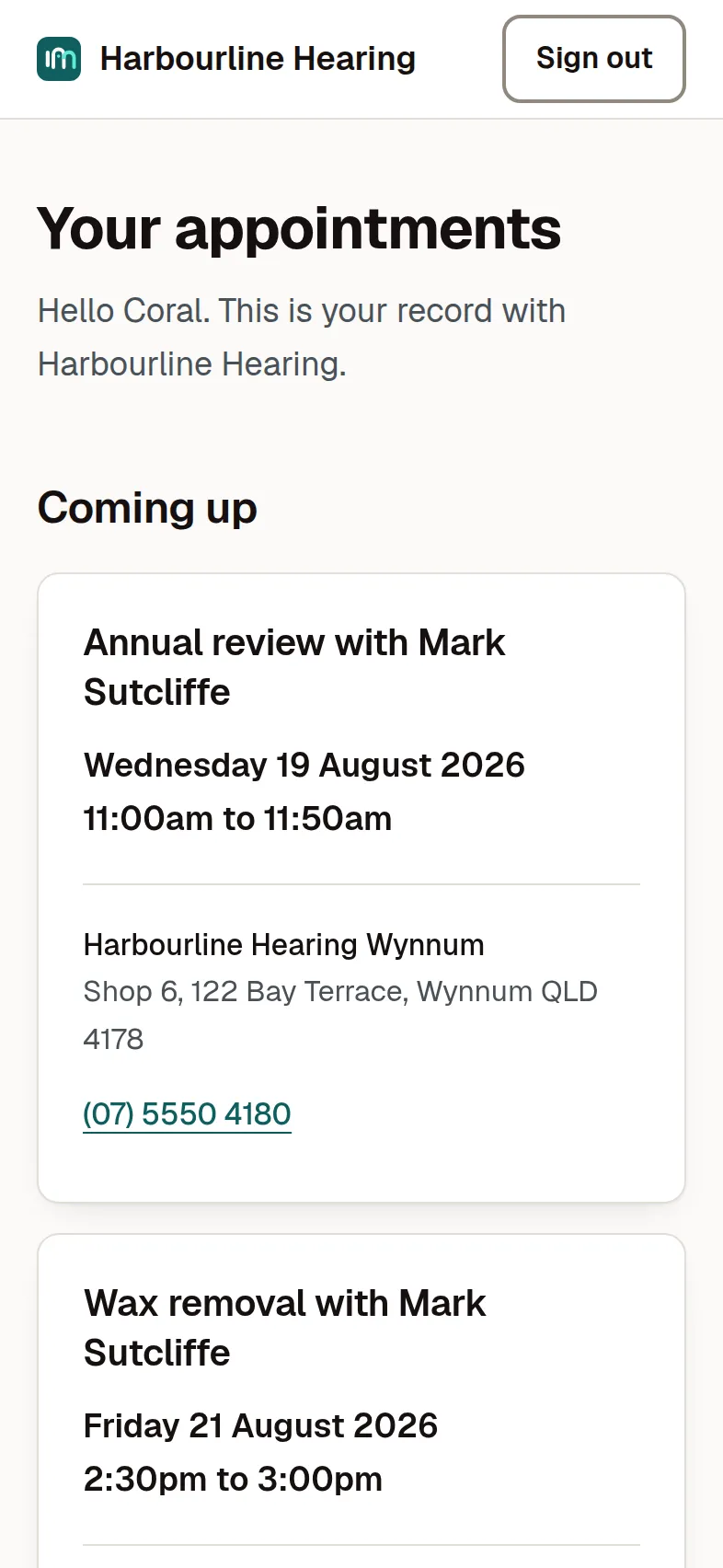
These are real screens from the product, photographed against a demonstration database. The practices, the people, the serial numbers and the claim references are invented, and no patient appears anywhere on this site.
The quickest way to judge it is to watch it work.
Half an hour, your own questions, and a look at the parts that matter to your practice. If you are moving from another system, we will talk about what comes across.